RawTake vs Kyno
Ahmed El Araby · Updated
Kyno is actively developed: version 1.9 shipped in September 2025 with native Apple silicon support and a darker interface. If anything below has changed, tell us and we’ll correct it.
Short answer. Kyno is a broad media-management tool. It browses, plays, logs, tags, renames, converts and backs up footage from almost any camera on Mac and Windows and sends clips to the main editing programs. RawTake does a smaller job on purpose: review a shoot, mark the good bits, reframe some, deliver verified files and a timeline. It does it on a Mac, with Sony footage first in mind, for a single one-time price. If you need a logging and metadata workstation, Kyno is the more complete tool. If you need to turn a full Sony shoot into clean selects tonight, that’s what RawTake is for.
What Kyno is
Kyno (made by Lesspain Software, owned by Signiant since 2021) is a desktop media browser for production and post. Its pitch is “save time on set and in post”: browse any folder without importing, play back most professional formats, log clips with metadata, ratings and comments, mark subclips, rename in batches, transcode and back up cards with checksum verification. It sends clips and selections to Final Cut Pro, Premiere Pro and DaVinci Resolve; Avid Media Composer (an ALE export) needs the Premium edition.
Pricing: Standard $159, for 2 computers with one year of updates, then $79 a year. Premium $349 adds RED R3D and Panasonic P2 playback, transcoding and rewrapping to MXF, Avid export, metadata presets and delivery tools, with a $169 renewal. An expired licence keeps working; you just stop getting updates. Team and student licences exist.
It’s a serious, mature product with years of real use behind it.
What RawTake is
RawTake is a $119 Mac app for the moment after a shoot. Open a folder, look over every clip, mark as many good moments as you like per clip, reframe some for vertical or square and run one queue. Plain trims are copied byte for byte (no re-encode); reframes are encoded once through the Mac’s hardware encoder. Every output is checked before it’s accepted, nothing is ever overwritten and the originals are never modified. It hands an editor a timeline for Resolve or Premiere that can point straight at the camera originals.
Where they differ
| Kyno | RawTake | |
|---|---|---|
| Price and platform | ||
| Price | $159 Standard / $349 Premium; updates renew yearly | $119 once (launch price), 14-day full trial |
| Platforms | Mac and Windows | Apple silicon Mac only (macOS 11 or later) |
| Machines per licence | 2 | 2 |
| Review | ||
| Browse a folder without importing | Yes: grid, list and detail views | Yes: a poster grid |
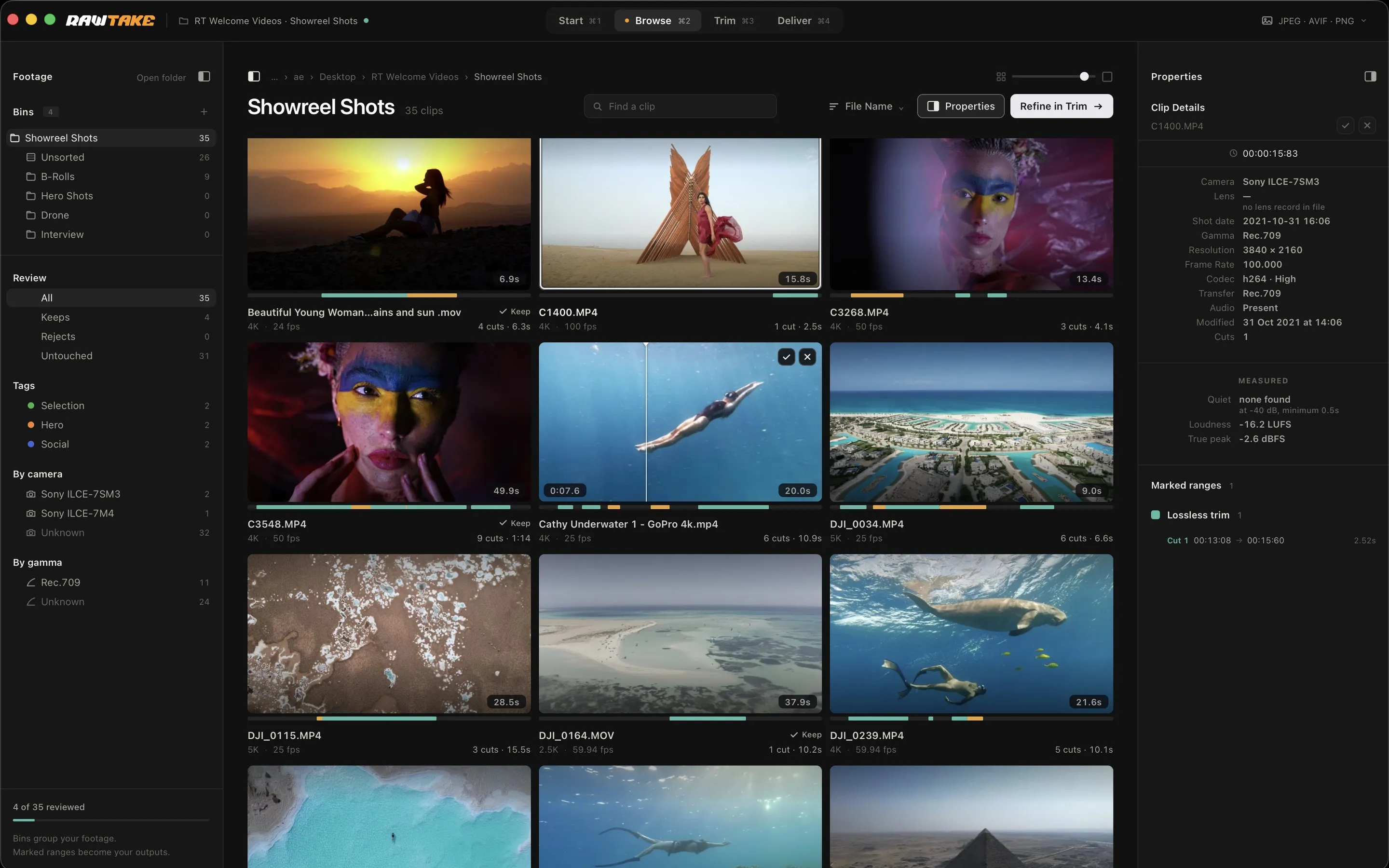
| Scrub a clip from its thumbnail without opening it | No | Yes: rest on a poster and it scrubs |
| Mark a cut | In the player, one clip at a time: I, O, then S for a subclip | On the poster (click, click) or in Trim with I and O |
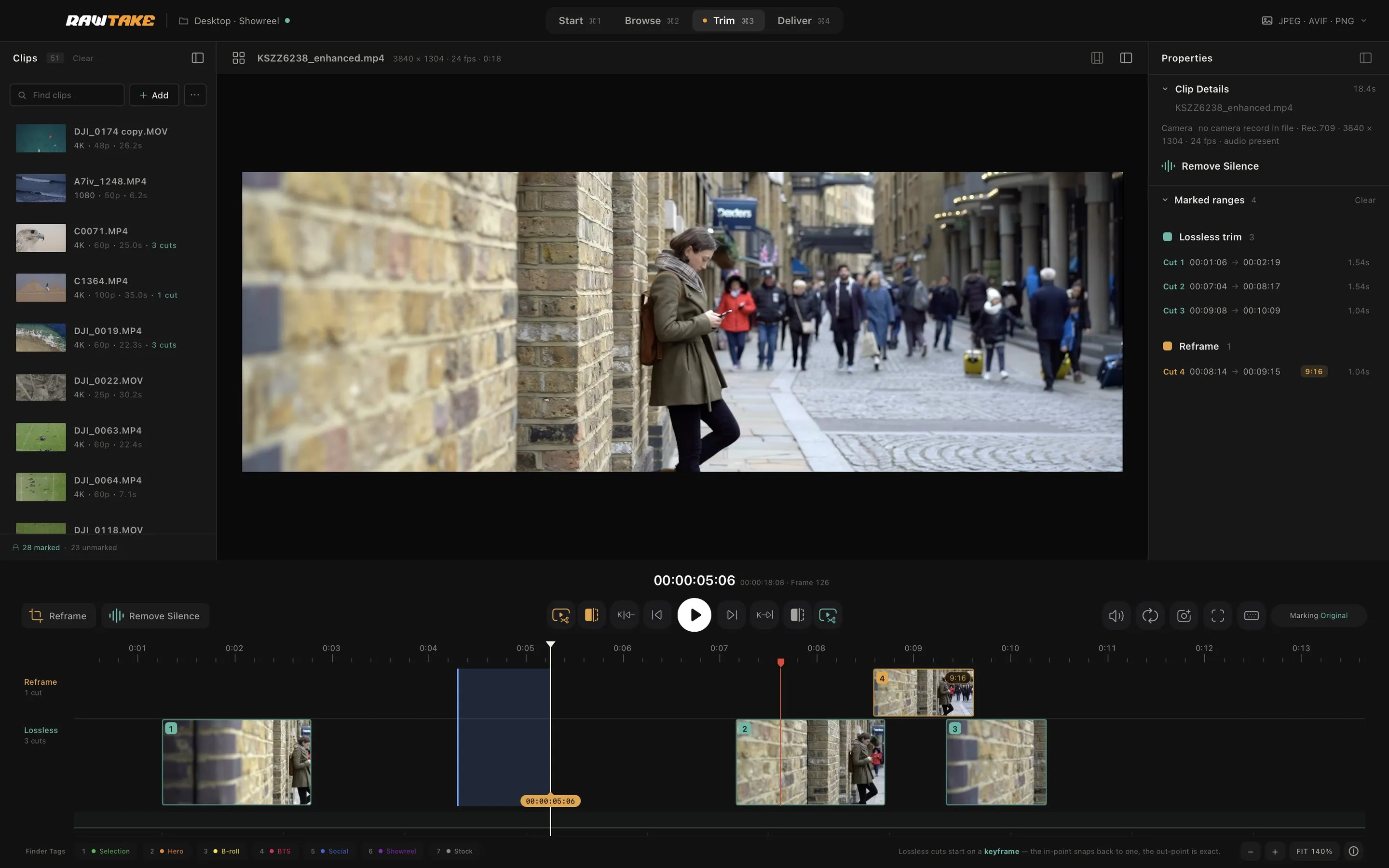
| Timeline for your cuts | No: subclips sit in a list beside the player | Yes: two lanes, lossless trims apart from reframes, the colour showing what each will cost |
| Play your marked cuts back to back | No: each subclip plays on its own | Yes: Preview Cuts |
| Multiple segments per clip | Yes (subclips) | Yes |
| Detect silence | Not listed in its features | Yes: Remove Silence proposes the cuts |
| Ratings / metadata logging | Yes: stars, comments, batch metadata editing | Keep / Reject, seven tags per cut, markers with notes; no metadata editor |
| Shot list to Excel | Yes | Not yet: on the roadmap |
| LUT preview | Yes | Not yet: on the roadmap |
| Deliver | ||
| Lossless trim (no re-encode) | Yes: rewrap presets | Yes: plain trims |
| Know which parts re-encode before you run | You pick a rewrap or a re-encode preset; it warns when a codec can’t be rewrapped | Yes: teal = copied, amber = re-encoded, on every segment |
| Crop / aspect reframe | Output size and anamorphic settings in presets; no crop box in its material | Yes: per segment, 9:16, 4:5, 1:1, 16:9, 2.39:1, 4:3 or free |
| Batch queue across the whole folder | Yes (transcode) | Yes: trims and reframes in one run |
| Output verified after writing | Backups only (Copy & Verify, xxHash checksums, MHL) | Every file: format and codec; frame count on re-encodes; failures set aside |
| Originals never modified | Metadata sits in hidden folders beside the media; batch rename and an optional XMP write for Premiere do change files | Yes; the one exception is an optional, reversible Finder tag |
| Batch rename | Yes | No, by design: RawTake never renames originals |
| Card offload with checksums (MHL) | Yes (Standard); up to 4 destinations in Premium | No |
| Stills export | Yes: batch still export | Yes: Frame Snap saves the exact frame at full resolution, one at a time |
| Handoff to the editor | ||
| What the editor receives | Clips with their marked sections, into Final Cut, Premiere or Resolve; Avid ALE in Premium | A timeline of your selects in order: Resolve FCPXML, Premiere FCP7 XML or both |
| Formats and interface | ||
| Plays Sony XAVC MXF | Yes | Yes: plays the original with Apple’s free Pro Video Formats add-on, a preview copy without it |
| Camera formats | Very broad; BRAW in Standard, RED R3D and P2 in Premium | Sony XAVC (MXF and MP4), Canon and ARRI MXF, ProRes, DJI, H.264 / HEVC; no camera RAW (BRAW, R3D, X-OCN, N-RAW, ARRIRAW) |
| Interface | One main window: folders, a browser and a player; darker theme since 1.9 | Four rooms in one window (Start, Browse, Trim, Deliver); dark, keyboard-first |
Three differences that matter most
The review pass. Kyno is a browser and logger: you open a clip, press I and O in its player, then S to make a subclip, one clip at a time; the subclips sit in a list. RawTake is built for ripping through a shoot: posters you scrub without opening, a click to start and a click to end, Keep and Reject, Remove Silence proposing the cuts and every cut on a timeline where you can see what it will cost. Kyno records what you thought about the footage; RawTake gets you to the selects.
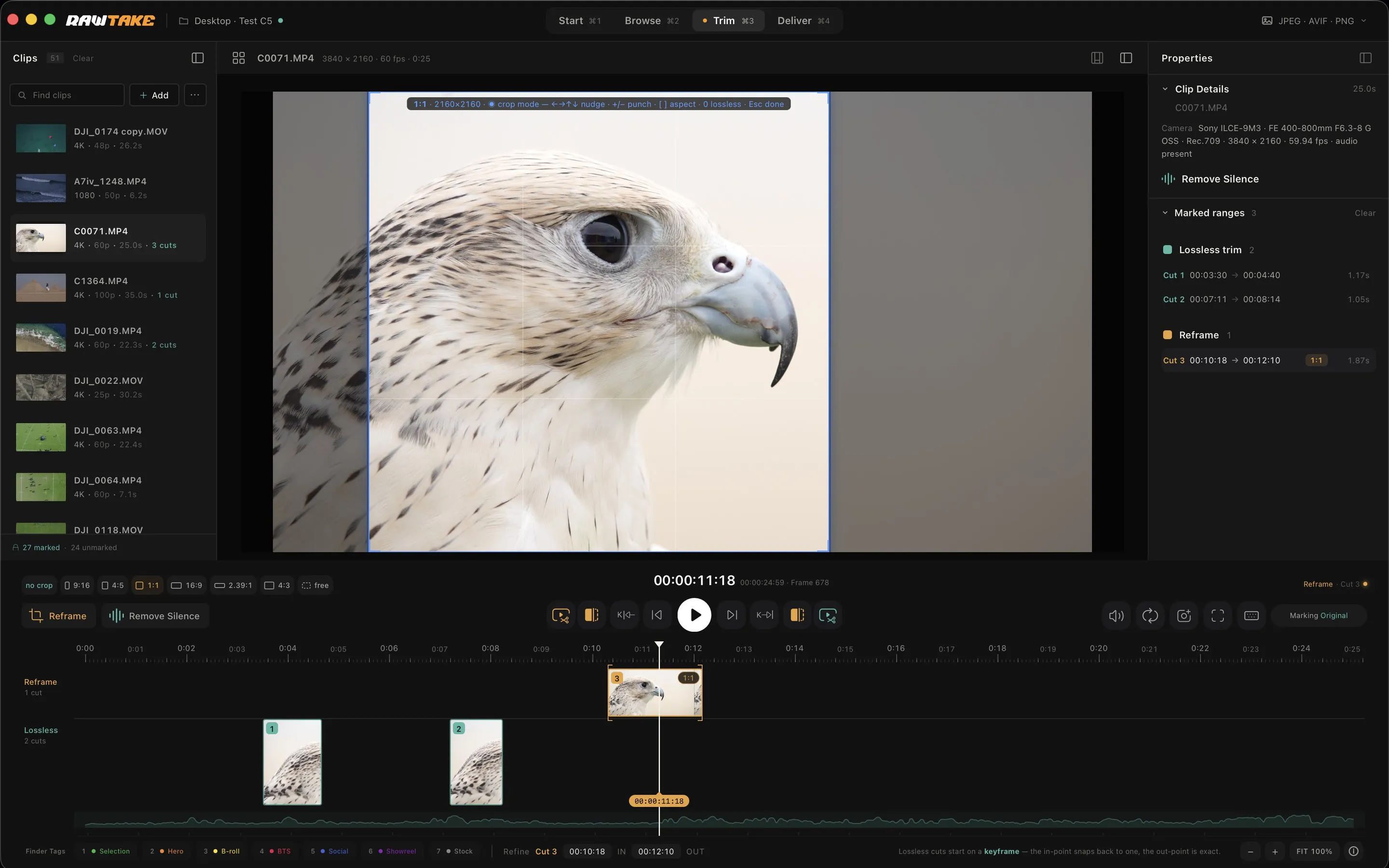
The timeline handoff. Kyno sends clips to an editing program, with their marked sections attached. RawTake writes a timeline of every segment you marked, in order, pointing either at the original camera files or at the new files it wrote. Your editor opens it and sees your decisions, not a bin of clips.
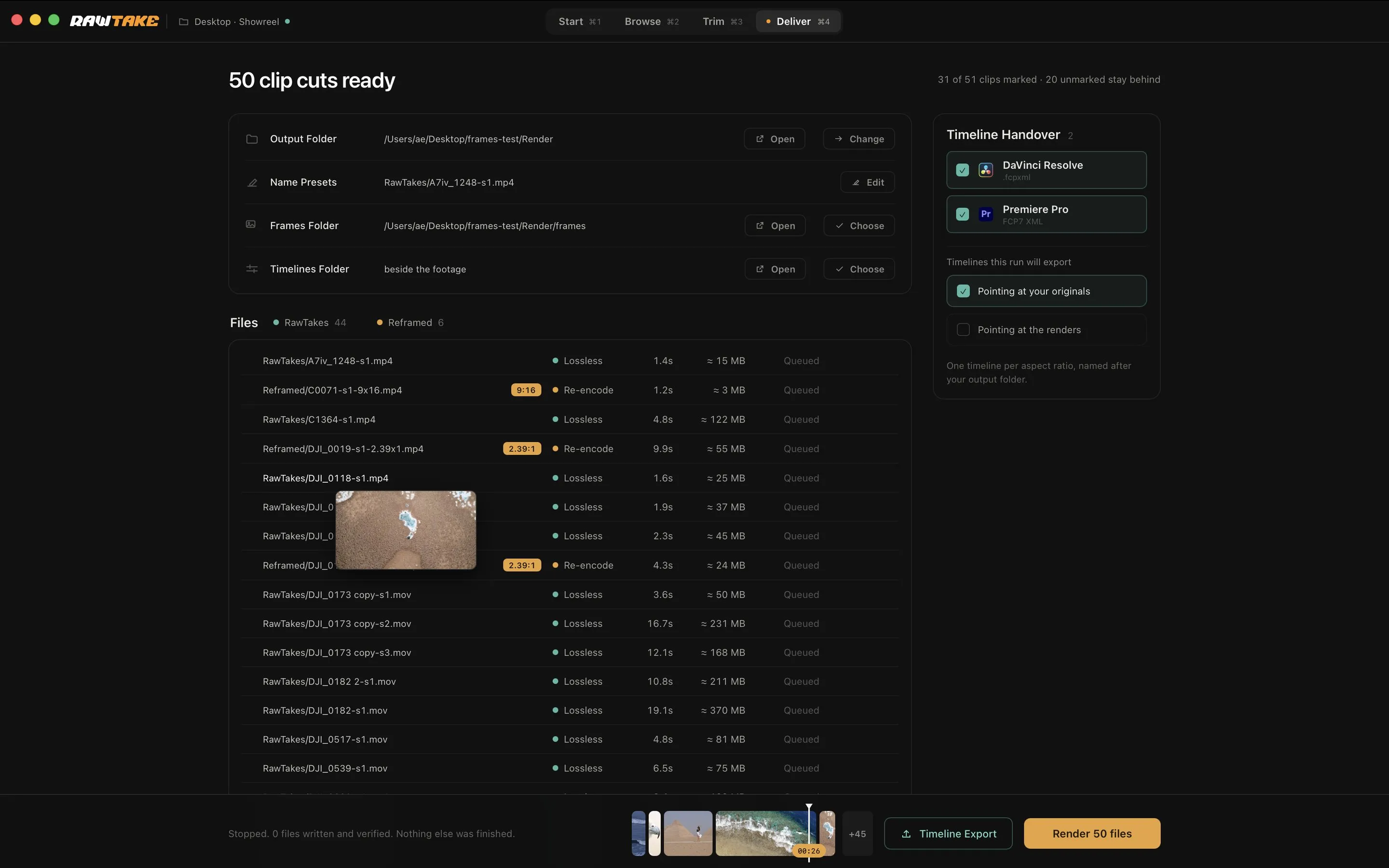
Verified, honest output. Every RawTake file is checked before it’s accepted. A failure is moved aside, never passed off as finished; nothing is ever overwritten; and the queue tells you before you run which segments are free copies and which will re-encode. That trust layer is the whole reason to batch hundreds of files at once.
Who should use which
Use Kyno if you work across Mac and Windows, shoot RED or Blackmagic RAW, need a proper metadata and ratings workstation, want shot lists in Excel, batch-rename footage or want Avid and Final Cut Pro in the loop.
Use RawTake if you shoot Sony (or ProRes or DJI) on a Mac and what you actually need after a shoot is clean selects and vertical reframes out of a full shoot, fast and verified with the originals untouched, plus a timeline your editor can open.
Not for you if
You want to edit, colour or mix. Neither tool does that.
Shooting Sony MXF? See how to play XAVC MXF files on a Mac. Weighing a free option? See RawTake vs LosslessCut.
Kyno is a product of Lesspain Software / Signiant, Inc. RawTake is not affiliated with either. Checked on 21 September 2026.